


SoundPackager 10 CD Key
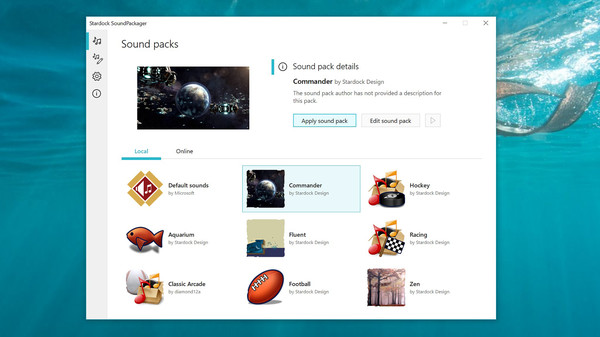
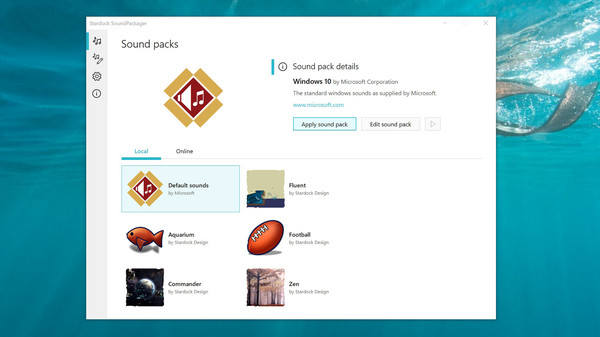
SoundPackager lets you customize your PC audio with premium sound packs, one-click installs, and cloud libraries of thousands of sounds. Preview, mix, and apply packs. Use the editor to create, save, and share personalized Windows sound packages.
Looking for the best price for SoundPackager 10? Compare offers from 2 stores on CheckGamePrices to find the cheapest Steam key available. Right now, the lowest price is 4.99$ at Steam.
Current Lowest Price
4.99$

Visit store



Release Date
06 May, 2020
Publisher/Developer
Stardock
Reviews
Steam: 63.16% positive (12/19)
Metacritic: -
System Requirements
Minimum:
- OS *: Windows 7 / 8.x / 10
- Processor: 1 GHz Processor
- Memory: 512 MB RAM
- Storage: 100 MB available space
- Additional Notes: 1024x768 minimum screen resolution
Recommended games



SoundPackager 10 Steam Price History Chart
Current Steam price: 4.99$
Lowest Steam price ever: 3.74$ — 2026-10-08
Lowest Steam price ever: 3.74$ — 2026-10-08
Loading SoundPackager 10 price history chart...
SoundPackager 10 description
SoundPackager 10
Transform your PC’s sonic landscape with SoundPackager 10. Replace the default Windows sound scheme with high‑quality, cohesive audio packages and enjoy instant changes that feel polished and professional. Tap into a vast cloud library and apply curated sounds to system events in seconds, without the hassle of downloading and matching tracks one by one.
What you get
- One‑click application of premium packages: quickly switch your entire PC sound theme with a single action, avoiding manual setup and event-by-event tweaks.
- Cloud access to thousands of sounds: browse, preview, and pick the perfect vibe from a growing library that fits any mood or project.
- Pre‑loaded premium packages: start right away with several high‑quality options already installed for immediate use.
- In‑app editor for full customization: create, edit, and tailor sound packages to your taste, then save and reuse them later.
- Mix and match across packages: blend sounds from different collections or bring in your own audio to craft a unique identity.
- Save favorites for quick access: build a personal gallery of presets and switch styles in seconds.
- Preview before applying: listen to each sound within the editor to ensure perfect cues and timing.
- Share your creations: publish custom packages to expand the community library and inspire others.
How it works
Install SoundPackager 10, pick a premium package, and apply it with a click. Open the built‑in editor to tailor sounds, mix elements from different packs, or import your own files. Use the live preview to refine cues, then save your creation as a reusable package. Sync with cloud libraries to explore new sounds and share your packs with the community for endless customization options.
Who benefits
SoundPackager 10 is ideal for gamers, streamers, content creators, and anyone who wants a consistent, expressive audio identity on their PC. It simplifies sound management while offering deep customization, collaboration, and a vibrant ecosystem of sounds that evolve with your needs.