
Driver4VR Puppeteer: Full Body Estimation CD Key
Current Lowest Price

Release Date
Publisher/Developer
Reviews
Game Tags
System Requirements
- Requires a 64-bit processor and operating system
- OS: Windows 10
- Processor: Intel® i5-4590 / AMD FX 8350 equivalent
- Memory: 8 GB RAM
- Graphics: NVIDIA GeForce® GTX 970 / AMD Radeon™ R9 290 equivalent
Driver4VR Puppeteer: Full Body Estimation Steam Price History Chart
Lowest Steam price ever: FREE — 2026-10-20 — Current low
Driver4VR Puppeteer: Full Body Estimation description
Driver4VR Puppeteer: Full Body Estimation
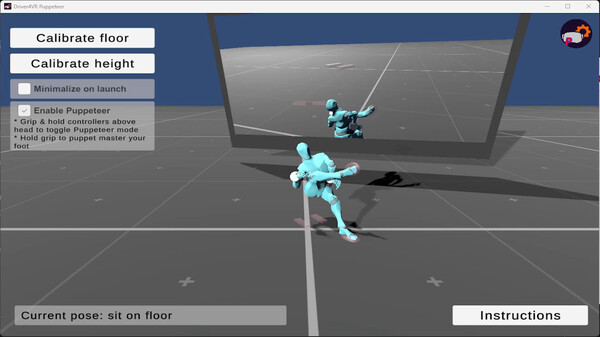
Driver4VR Puppeteer is an innovative VR experience that allows users to bring their avatars to life through precise control of movements. In Puppeteer Mode, players can manipulate their avatar's feet with the controllers, similar to a Puppet Master, allowing for detailed and dynamic performances during specific interactions or dances.
One of the standout features is Dynamic Pose Estimation, which calculates body positions in real-time, ensuring a seamless experience, even for untracked body parts. This technology operates with low CPU usage, making it efficient and preventing strain on your device's performance. The system requires no additional hardware, functioning seamlessly with your existing VR headset and controllers.
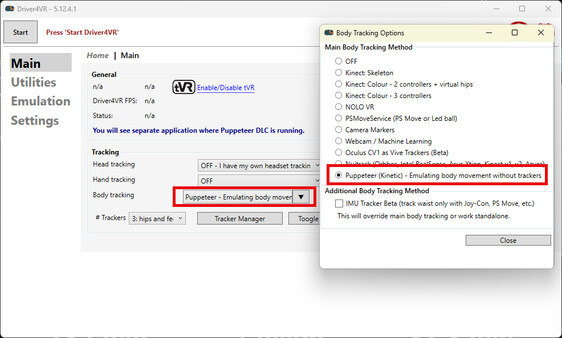
Setup is easy: simply select the 'Puppeteer' option in the Body Tracking settings, download the DLC, and launch the application. Calibration involves positioning your controllers on the floor and adjusting your height, making the setup straightforward for quick access to immersive gameplay.
With Puppeteer Mode activated, just hold your hands above your head to control foot movements, providing an engaging way to interact with the virtual world.