
FrontEngine CD Key
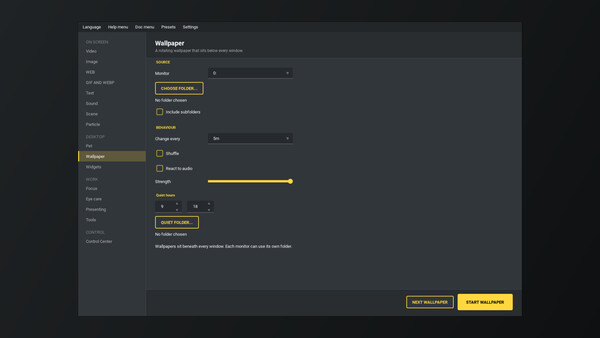
FrontEngine is a versatile software that lets you display various front views on your screen, including videos, images, websites, GIFs, and audio. It offers dynamic content management and text overlays, allowing users to create and manage multiple scenes easily, with customizable input options.
Looking for the best price for FrontEngine? Compare offers from 1 stores on CheckGamePrices to find the cheapest Steam key available. Right now, the lowest price is 2.00$ at Steam.
Current Lowest Price
2.00$

Visit store


Release Date
16 May, 2024
Publisher/Developer
JeffreyChen
Reviews
Steam: -
Metacritic: -
System Requirements
Minimum:
- Requires a 64-bit processor and operating system
- OS: Windows 10
- Processor: Intel i5-6600 | Ryzen 3 1300X
- Memory: 8 GB RAM
- Graphics: Nvidia GTX 1050
- DirectX: Version 11
- Network: Broadband Internet connection
- Storage: 5 GB available space
FrontEngine Steam Price History Chart
Current Steam price: 2.00$
Lowest Steam price ever: 1.50$ — 2026-08-08
Lowest Steam price ever: 1.50$ — 2026-08-08
Loading FrontEngine price history chart...
FrontEngine description
FrontEngine Game Description
FrontEngine is a versatile software application that enhances your screen experience by enabling various front view options. Users can select from a wide range of view types:
- Video View: Set an MP4 file as the front view, which will automatically loop without capturing mouse or keyboard input.
- Image View: Display a static PNG or JPG image; similar to the Video View, this will not capture any input.
- Website View: Use a URL or local HTML file for a dynamic or static front view. This allows for user input if the input checkbox is enabled.
- GIF & WEBP View: Loop animations from GIF or WEBP files effortlessly.
- Sound Player: Play audio files in formats like WAV, MP3, or MP4.
- Text Overlay: Display customizable text on your screen.
Manage scenes effectively with scene scripts and the ability to import/export scene_setting.json files. This feature allows for simultaneous view displays without manual switching. To stop FrontEngine at any moment, simply press F12.